Tutorial: Building an AI Assistant with ESP32-S3
In this tutorial, we'll guide you through creating an AI assistant using the ESP32-S3, a microphone, and a speaker. This project will capture audio, process it with AI, and respond with synthesized s

Demo
Materials Needed
- ESP32-S3 Devkit
- INMP441 Microphone
- MAX98357A Amplifier
- 0.5W Speaker
- Breadboard and Jumper Wires
Circuit Setup
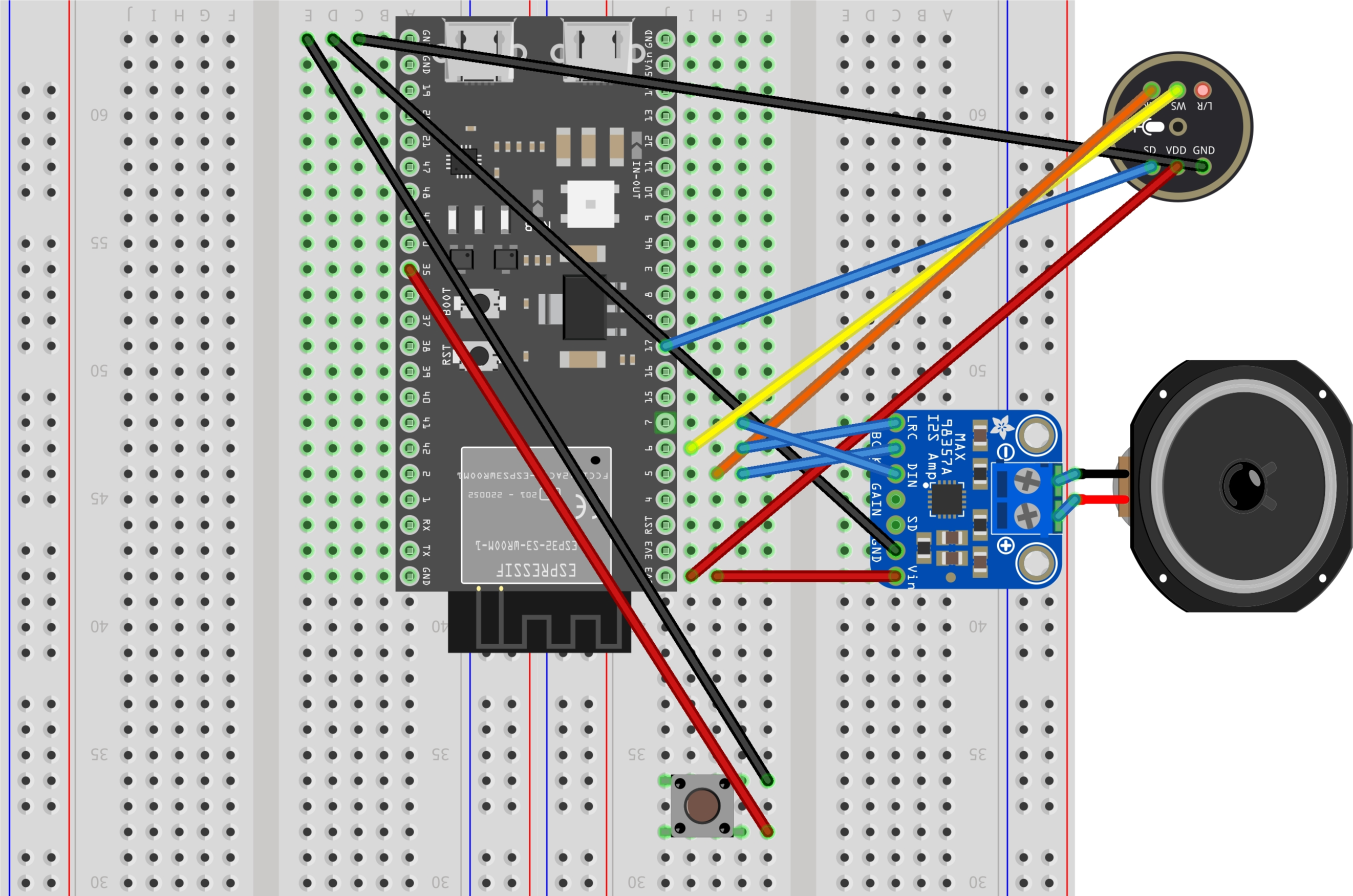
1. **Connect the Microphone (INMP441):**
- VDD to 3.3V
- GND to GND
- SCK to GPIO 5
- WS to GPIO 6
- SD to GPIO 17
2. **Connect the Amplifier (MAX98357A):**
- VIN to 3.3V
- GND to GND
- BCLK to GPIO 5
- LRC to GPIO 6
- DIN to GPIO 7
3. **Connect the Speaker:**
- Connect the speaker to the output terminals of the MAX98357A.
4. **Connect the Button:**
- Connect one terminal to GPIO 35 and the other to GND.
5. **Connect the RGB LED:**
- Connect to GPIO 48.
Software Setup
Arduino Code
1. **Install Required Libraries:**
- Install `ArduinoWebsockets` and `Adafruit_NeoPixel` libraries via the Arduino Library Manager.
2. **Upload the Code:**
- Use the provided `code.ino` file.
- Update the WiFi credentials and WebSocket server details.
Node.js Server
1. **Install Node.js and Required Packages:**
npm install ws wav openai fluent-ffmpeg
2. **Run the Server:**
- Use the `server.js` file.
- Replace the OpenAI API key with your own.
### Running the Project
1. **Start the Node.js Server:**
node server.js
2. **Power the ESP32-S3:**
- Connect it to your computer or a power source.
3. **Interact with the AI Assistant:**
- Press the button to start recording.
- Speak into the microphone.
- The AI will process your speech and respond through the speaker.
## Explanation
- **ESP32-S3** captures audio and sends it to the server via WebSocket.
- **Node.js Server** processes the audio using OpenAI's API and sends back a response.
- **ESP32-S3** plays the response through the speaker.
## Troubleshooting
- Ensure all connections are secure.
- Check WiFi credentials and server IP.
- Verify the OpenAI API key is correct.
This project demonstrates a simple AI assistant using readily available components. Enjoy experimenting and expanding its capabilities!
Please share the required coding, thanks.